
Implement IPv6 on Server 2003 @wallaceho.com

In Windows Server 2003 environment, there is no IPv6 feature installed, so that it need to install manually.

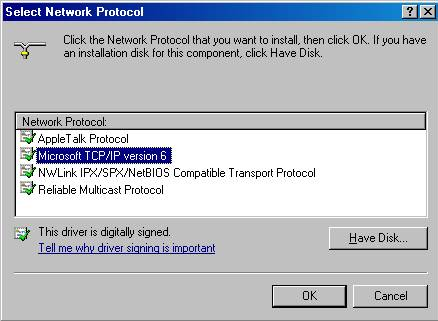
Simply click on the network protocol page on the network card proprieties, install the IPv6 feature.
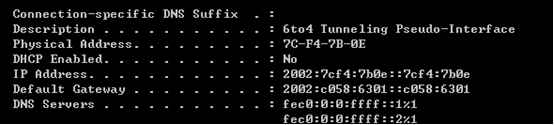
After that, if your ISP support IPv6, you can get a IPv6 public address.
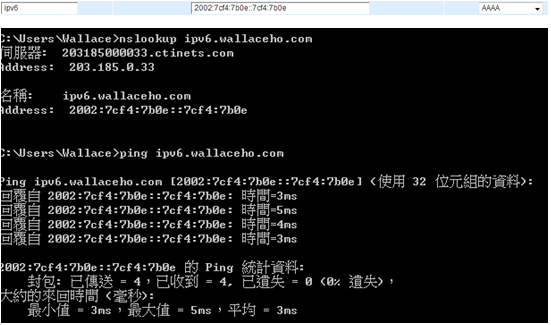
Add record type “AAAA” with the IP on the host record on your name server and try to ping the address see if it is success.
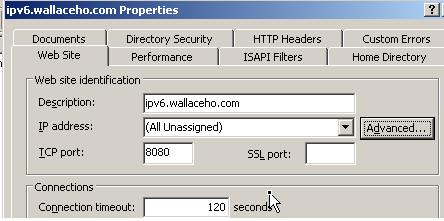
From IIS6, it support IPv6 connection, so that just simply setup the IIS configuration and start the server.
You can get on the page now 🙂 If you can get on my page and get your IPv6 IP, that’s mean your network support IPv6 feature.


ipv6 ready

Fyproject process till 9/3

呢幾日都一直係度研究個C# 連mysql  同埋點樣去運用timer 去係某個特定時間run 個 send mail method.

經過自己做左好耐既researsh, 發覺原來要先download一個mysql.data 既 library 再import 入去個C#度~

而家解決左連mysql 既問題,但如果直接用data reader 去read 啲data 既話,就無法結合到落個timer度。

換言之,我地要利用dataset (好彩上個sem學過) 將啲data 倒左入去先,之後係個dataset度慢慢read返出黎。

mail

綠色comment 左既地方就係之前試用reader 既方法。

最後用左dataset 成功讀取!!

ha..所以話只要你肯努力冇野係冇可能!

C# coding Copyright By Wallace

Prevent DoS/DDoS On Linux

Last month my server have been ddos by someone, so that I have search on the internet and see how can I prevent it. It’s juz very simple, as u know the linux firewall “iptable”. u can wirte a shell script monitoring the netstats and check whether an IP address have how many connections in this peroid. If there are more than X(u can set a variable on it) connections, the ip address will be ban for X minutes by iptables. Moreover, if there is any ip address has been banned, a email will sent to your administrator account, and I have tested by myself, it works! That’s a great shell script!

1

Checking how many connections does those IP address

2

If there are someone been banned, an email will be received

3

Testing the function:P 123.203.109.188 is my IP address and trying to hack DrKn(Kenny)’s Server 😛

backup your MySQL using a bash script and cron job

From allenkan.com/blog
useful sql backup command
1. dump the DB into a sql file
mysqldump -u <username> -p<password> <database> > <output file name>.sql

2. compress it
gzip <Filename>

3. Ftp send to backup server
** it is not suggested because backup ftp account and the backup data is sent in plain text format **

ftp -n $ftpserver <<END_SCRIPT
quote USER $ftpuser
quote PASS $ftppwd
put $gzipOutFile
quit
END_SCRIPT
exit 0

24/10

All STEAM server needs to be update since yesterday, otherwise the server will be pop-up a warning message something like…”Please update and restart the server”. If you ignore this warning, your server will not be listed on the master server list.

The new version was 4381 for windows and for linux it was 4352. It has also changed the protocol from 47 to 48. Therefore, the old version client can not connect to the new server anymore unless you update the new version. It means that the old version of non-steam client could not getting into the new version server. The new version of client can not join the server which hasn’t been upgraded as well.

Those servers which are hosted by wallaceho.com has been prompt upgraded to new version. However, there are still have many server which have not been upgraded till to now, for example: hkspirit

The new version of client has added many functions, one of it is while you showing up the score board, you may saw the photo of your friend list.