| Cisco | Huawei |
|---|---|
| EXEC mode | user view |
| traceroute | tracert |
| terminal length 0 | screen-length 0 temporary |
| show | display |
| show version | display version |
| show history-command | display history-command |
| show interfaces | display interface |
| show ip interface | display ip interface |
| show ip route | display ip routing-table |
| show ip bgp | display bgp routing-table |
| show clock | display clock |
| show flash | dir flash: |
| show logging | display logbuffer |
| show snmp | display snmp-agent statistics |
| show users | display users |
| show tech-support | display diagnostic-information |
| write terminal, show running-config |
display current-configuration |
| more nvram:startup-config, show startup-config |
display saved-configuration |
| write erase | reset saved-configuration |
| write memory, copy running-config startup-config |
save |
| clear | reset |
| clear counters | reset counters interface |
| clear interface | reset counters interface |
| clear access-list counters | reset acl counter all |
| no | undo |
| debug / no debug | debugging / undo debugging |
| reload | reboot |
| enable | super |
| disable | super 0 |
| erase | delete |
| exit | quit |
| configure terminal | system-view |
| configuration mode | system view |
| end | return |
| snmp-server | snmp-agent |
| hostname | sysname |
| router bgp | bgp |
| router ospf | ospf |
| router rip | rip |
| shutdown / no shutdown | shutdown / undo shutdown |
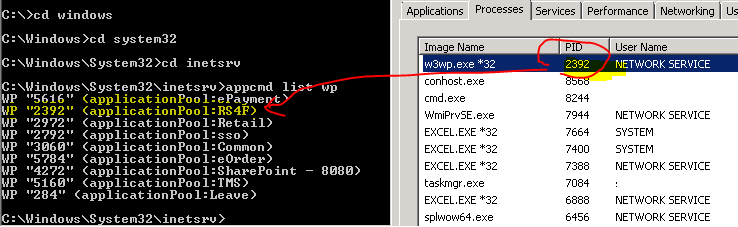
Check IIS process by PID

CAPWAP Controller Discovery Process
In a controller-based architecture, CAPWAP access points are dependent on a wireless controller to provide the software image, configuration, and centralized control and optionally data forwarding functions. Therefore, it is necessary for the access point to find a list of available controllers with which it can associate.
The following layer 3 CAPWAP discovery options are supported:
- Broadcast on the local subnet
- Local NVRAM list of the previously joined controller, previous mobility group members, and administrator primed controller through the console port
- Over the Air Provisioning (OTAP) (subsequently removed in version 6.0.170.0 code)
- DHCP Option 43 returned from the DHCP server
- DNS lookup for “CISCO-CAPWAP-CONTROLLER.localdomain“
Broadcast Continue reading
end-of-line code on linux and windows
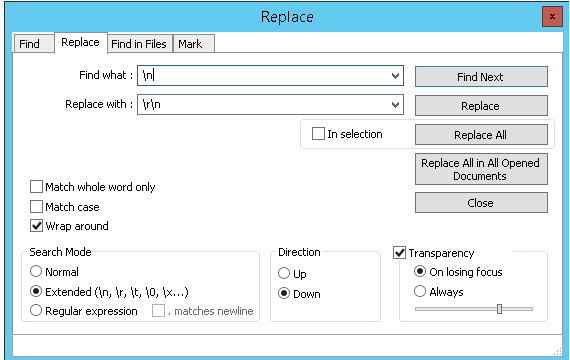
In Unix and all Unix-like systems, \n is the code for end-of-line, \r means nothing special. However in Windows (and many old OSs), the code for end of line is 2 characters, \r\n
For the file created on any Unix system, the end-of-line code is not work opening via notepad on Windows. Replace the code \n to \r\n on notepad++ to solve this problem.

ShadowSocks server for Windows
Install SS server in a easiest way on a Windows platform machine.
- Download & Install Python 3.4.3 –
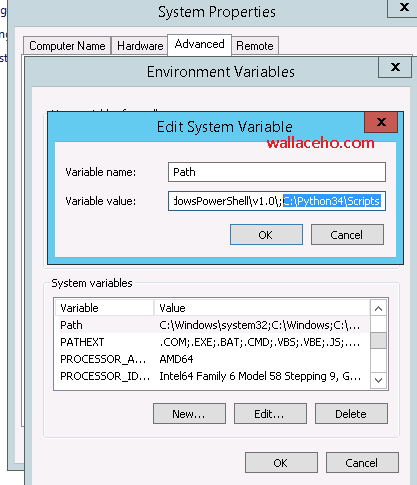
https://www.python.org/downloads/windows/ - Add C:\Python34\Scripts in the Environment Variables

- Download & Install OpenSSL
– https://slproweb.com/products/Win32OpenSSL.html - Open CMD enter “pip install shadowsocks”
- Create a text file under C:\Python34\Scripts\config.json
{
“server”:”0.0.0.0″,
“server_port”:8388,
“local_address”:”127.0.0.1″,
“local_port”:1080,
“password”:”your_password”,
“timeout”:300,
“method”:”aes-256-cfb”,
“fast_open”:false
}
The following table explain the parameter.Name Explanation server the address your server listens server_port server port local_address the address your local listens local_port local port password password used for encryption timeout in seconds method see Encryption fast_open use TCP-Fast-Open, true / false workers number of workers - Use command ssserver -c “C:\Python34\Scripts\config.json” to launch the server.